
WigoSend
WigoSend Team

Turn shared customer email into an accountable team workflow.

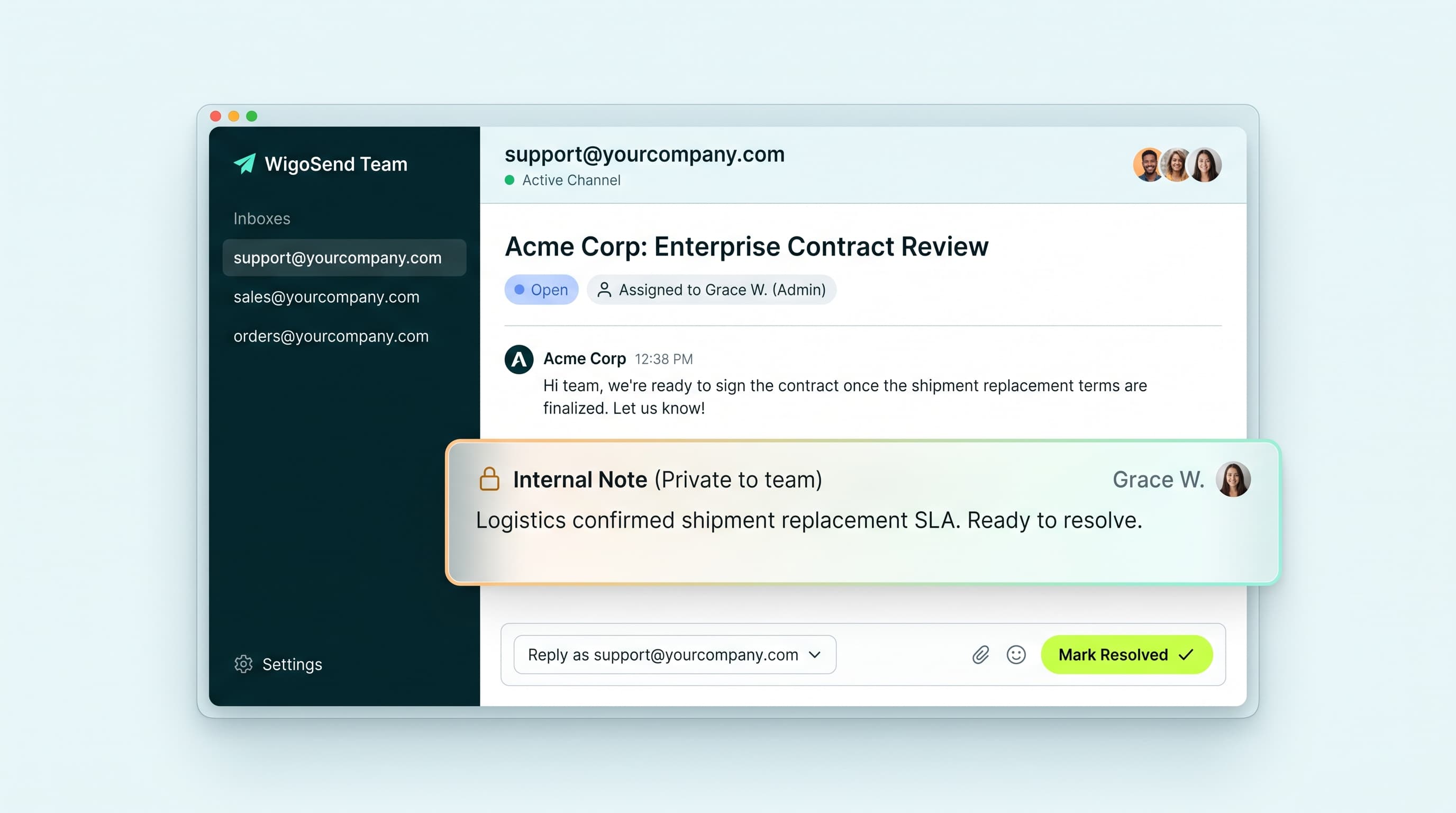
WigoSend Team helps your team manage addresses like support@, sales@, and orders@ without sharing one password. Assign conversations, collaborate privately with internal notes, and maintain crystal-clear visibility.
See how Team works
Connects to Mail or external emailNo credit card required
WigoSend Team Shared Inbox
When everyone has access, nobody owns the reply

Shared customer email becomes chaotic when ownership is unclear.

Many businesses start by giving several people access to the same customer-facing address. It seems simple, until two people reply to the same message, an important enquiry sits unanswered, or nobody knows what happened after the last response.

WigoSend Team gives every conversation a clear place, owner, status, and history. Read our breakdown on why distribution lists fail growing teams.

How Team works

From incoming message to resolved conversation.

Team turns a shared address into a workflow your team can follow.

  1. 01

    Receive

    A message arrives at a connected address such as support@ or sales@ and appears in the shared inbox.

  2. 02

    Assign

    Give the conversation to a specific team member so everyone knows who owns the next response.

  3. 03

    Collaborate

    Add an internal note to share context with colleagues without sending it to the customer.

  4. 04

    Reply

    Respond from the authorized shared address, so the customer receives a consistent business reply.

  5. 05

    Resolve

    Mark the conversation resolved when the current request is handled. Open and pending work remains visible to the team.

Clear boundaries by design

Collaboration without exposing the wrong information.

Team is built around explicit connections and permissions. Your team can work together on shared customer conversations without automatically exposing personal mail or changing who the customer sees as the sender.

Personal email stays private

Joining a Team workspace does not automatically connect or expose a member's personal mailbox.

Access is granted deliberately

A channel must be connected explicitly, and access to a shared inbox is granted separately.

Assignments stay internal

Assigning a conversation identifies the internal owner. It does not change the customer-facing sender.

Internal notes stay internal

Notes help your team collaborate, but they are never included in customer replies.

What your team can do

A clearer way to work from shared addresses.

Shared inboxes

Bring messages from approved customer-facing channels into one organized workspace.

Clear ownership

Assign conversations, reassign work, or let team members claim unassigned conversations.

Private collaboration

Add internal notes and context without exposing team discussion to customers.

Visible progress

Use Open, Pending, and Resolved statuses to see what needs attention and what is complete.

Consistent replies

Reply from the authorized shared sender identity instead of a personal address.

Find the right conversation

Search and filter permitted conversations by inbox, assignee, status, tag, date, or channel.

Built for the addresses your business runs on

Keep every customer-facing team organized.

support@

Customer support

Assign support@ conversations, add private context, and track requests until they are resolved.

sales@

Sales enquiries

Give sales enquiries a clear owner and keep follow-up visible across the team.

accounts@

Finance and billing

Coordinate payment, invoice, and account questions without passing around a shared password.

orders@

Operations

Manage orders@, operations@, or other business addresses with statuses, tags, and shared visibility.

Use the email you already have

Start with WigoSend Mail or connect a supported provider.

With WigoSend Mail

Connect through your existing workspace

Connect eligible WigoSend Mail channels to Team through an explicit setup flow. Manage both products from the same WigoSend workspace and receive integrated Mail + Team pricing.

Automatic integration • Unified billing
With your existing email

Connect a supported external provider

Connect a supported Google, Microsoft, or SMTP email source without moving your email host first. Team operates as a standalone product with its own subscription and capacity.

Standalone subscription • Any provider
Pricing that fits your workflow

Choose the Team capacity your business needs.

WigoSend Team uses capacity bands rather than charging separately for every agent. Each band is built around the resources your workspace uses, including team members, connected channels, shared inboxes, conversation history, templates, and tags.

Use Team with WigoSend Mail and eligible integrated pricing applies automatically.
Use Team with a supported external email provider through the standalone Team path.
Try the workflow before you commit

Explore Team for 14 days.

Connect a shared address, invite your team, and try the full receive, assign, collaborate, reply, and resolve workflow. No payment method is required to start, and the trial does not convert automatically.

Team has its own trial, separate from WigoSend Mail. You can start a Team trial whether or not WigoSend hosts your business email.

Team is not your employee email host

Team handles shared customer addresses. Mail handles individual business email.

WigoSend Team is for shared addresses such as support@ and sales@. WigoSend Mail is for individual employee mailboxes and the broader everyday workspace. They are separate products, and Team can also operate with a supported external email provider.

Already using another provider? You can continue using Team that way, or explore WigoSend Mail whenever hosting your business email with WigoSend becomes useful.

Common questions

Questions, answered.

Does Team replace my email provider?

No. Team organizes shared, customer-facing email. It does not replace the service that hosts individual employee mailboxes. You can use Team with WigoSend Mail or a supported external provider.

Can I use Team with Google or Microsoft email?

Yes. Team supports Google, Microsoft, and supported SMTP connection types for compatible email sources. The connection flow and available capabilities depend on the provider and configuration.

Does joining Team expose my personal email?

No. Team membership does not automatically connect or expose a member's personal mailbox. Personal channels are private by default and require explicit connection and access grants.

Is Team included with WigoSend Mail?

No. Team is a separate product with its own subscription and trial. Eligible Mail customers receive integrated Mail + Team pricing when both products are active.

What happens when someone is assigned a conversation?

Assignment records who is responsible internally. It does not change the sender address. A reply from a shared inbox continues to use the authorized shared address by default.

Can customers see internal notes?

No. Internal notes are for authorized Team users and are excluded from customer-facing replies.

What statuses does Team use?

The statuses are Open, Pending, and Resolved. Open means the team needs to act, Pending means the team is waiting, and Resolved means the current request is considered complete.

What happens if an email connection fails?

Team shows the affected channel's health state and preserves existing conversations according to the active history entitlement. Replies are blocked while sender authorization is invalid, and the channel must be reconnected before sending resumes.

Does Team support reports?

Team includes basic operational reporting such as conversation counts, status counts, assignments, workload, and activity. Advanced analytics, SLA reporting, and complex performance scoring are not part of the MVP.

Can I export my Team data?

Complete Team workspace export is not included in the current version. This limitation is disclosed here rather than left implied.

Give every shared conversation a clear owner.

Start your 14-day WigoSend Team trial and see how your team can move customer email from received to resolved.

Talk to us

No payment method is required to start. Your trial does not convert automatically.